Lovable is great for going from idea to working prototype fast. But once you've built something, you need a way to share it, with a client, a teammate, a hiring manager, or the internet. The good news: if your Lovable project is a static front-end, you can host your Lovable site for free without touching git, servers, or build pipelines.
This guide walks through the fastest path: export the built output from Lovable, then drop it on a static host that gives you a live HTTPS URL in seconds.
What "hosting a Lovable site" actually means
Lovable generates a front-end app, typically a React/Vite project. When you export or build it, you end up with a folder of static files: index.html, some JavaScript bundles, CSS, and assets. That folder is the entire site. Any static host can serve it.
There are two things to be clear about before you pick a host:
- Static vs. server code. If your Lovable project only calls external APIs (Supabase, Stripe, OpenAI, your own backend), it's purely static and can be hosted anywhere. If you added a custom Node server, you'll need a platform that runs Node, that's a different problem.
- Environment variables. Any keys baked into the build are shipped to the browser. Use public/anon keys only, and put sensitive logic behind an API you control.
Assuming you're in the common case, a static Lovable front-end talking to Supabase or similar, you can host your Lovable site for free in under five minutes.
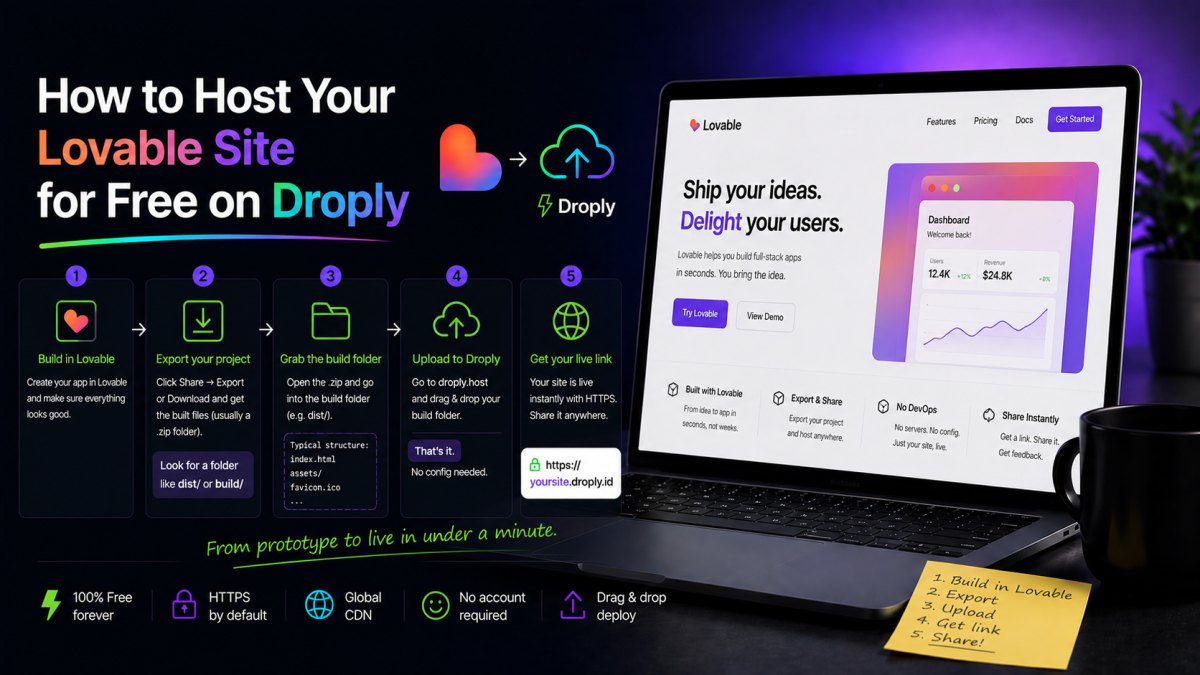
Step 1: Export your Lovable project
Inside Lovable, connect the project to GitHub (or use the built-in export) so you have the source code locally. Then, in a terminal:
npm install
npm run build
This produces a dist/ folder (Vite's default) containing your production site. That's the folder you'll upload. If your package.json uses a different output directory, check the build script, it'll be dist, build, or out in almost every case.
Quick sanity check before uploading:
- Open
dist/index.html, it should exist and reference hashed JS/CSS files. - Preview locally with
npx serve distand click through the app. If it works here, it'll work when hosted. - If your app uses client-side routing (React Router), make sure your host supports SPA fallback to
index.html, or configure hash-based routing.
Step 2: Pick a free static host
There are several ways to host your Lovable site for free. The right choice depends on how much setup you're willing to do.
Option A: Droply (drag-and-drop, no git)
If you just want a URL right now, zip your dist/ folder and drop it on Droply. You pick a name, and your site goes live at yourname.droply.id over HTTPS in a few seconds. No git, no build config, no CLI.
This is a good fit when you want to:
- Share a Lovable prototype with a client or stakeholder immediately.
- Publish a landing page, portfolio, or one-off microsite.
- Push updates by re-uploading, the URL never changes, so links you've shared keep working.
- Host a PDF spec, pitch deck, or design doc alongside the site under the same account.
Paid plans add custom domains and remove the "powered by" banner. See /#pricing for details.
Option B: Netlify or Vercel (git-based)
Both offer generous free tiers for static hosting and integrate with GitHub. You connect the repo, they run npm run build on their servers, and deploy the output. Great if you want auto-deploy on every push and you're comfortable with CI-style workflows.
Trade-off: you need a GitHub repo, a working build config, and you'll spend more time on setup than on shipping. If Lovable already handles the build for you, running it again in CI is redundant.
Option C: GitHub Pages or Cloudflare Pages
Also free, also static. GitHub Pages is fine for personal projects but has quirks around SPA routing and custom domains. Cloudflare Pages is faster and more flexible but has a similar git-first workflow to Netlify/Vercel.
Which should you pick?
- You want it live in 60 seconds: Droply. Drag, drop, done.
- You want automatic redeploys from a repo: Netlify, Vercel, or Cloudflare Pages.
- You want the deepest free tier for a long-term project with build steps: Netlify or Vercel.
For most Lovable users, especially designers, founders, and freelancers sharing work, the drag-and-drop path wins because the build already happened on your machine.
Step 3: Deploy
Deploying via drag-and-drop
- Run
npm run buildin your Lovable project. - Zip the
dist/folder (or upload it as-is if your host accepts folders). - Drop the file on the host, pick a subdomain name, and wait a few seconds.
- Open the URL and test the app end-to-end.
To update the site later, re-upload. On Droply, re-uploading replaces the content in place, so the URL stays the same, send it to a client once and keep iterating behind it.
Deploying via git
- Push your Lovable project to GitHub.
- Connect the repo to Netlify, Vercel, or Cloudflare Pages.
- Set build command to
npm run buildand output directory todist. - Trigger the first deploy. Future pushes redeploy automatically.
Step 4: Handle the details
A few things that catch people out when they host their Lovable site for free:
- API keys. Anything in
import.meta.env.VITE_*ends up in the browser bundle. Use public keys only. - CORS. If Lovable calls your own backend, make sure that backend's CORS allow-list includes the new production URL.
- SPA routing. If you get a 404 when refreshing a deep link, configure the host to fall back to
index.htmlfor unknown routes. - Assets. Large images and videos count against bandwidth on free tiers. Compress before shipping.
- Custom domain. Free subdomains are fine for prototypes. When you're ready to put the site on your own domain, most hosts (including Droply on paid plans) support it with a DNS record.
Beyond the Lovable site
Once you have a fast, free static host wired up, it becomes the default place to put anything you need to share:
- A standalone
index.htmlmockup you're prototyping outside Lovable. - A PDF proposal or case study you want to send as a link instead of an attachment.
- A ZIP export from Figma, Framer, Webflow, or any other tool that produces static output.
That's the whole point of static hosting: one workflow, many outputs. Build in Lovable, export, drop it on a host, share the link. The less time you spend on infrastructure, the more time you spend on the work itself.