The short answer
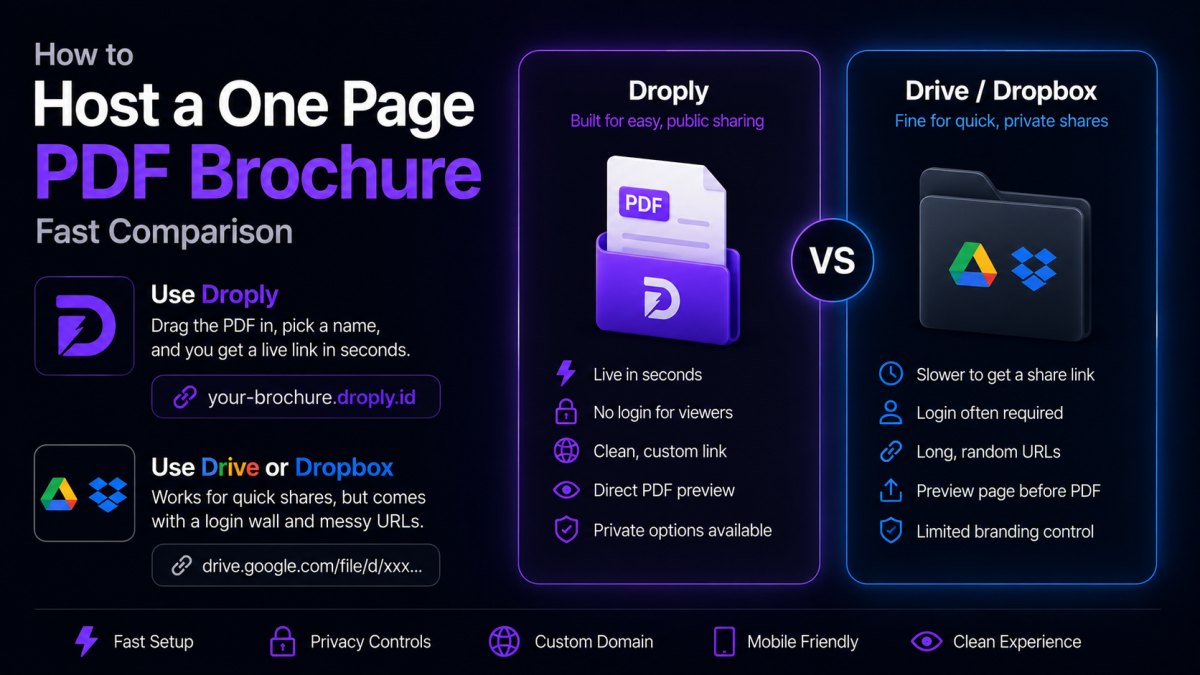
If you want a clean link you can put on a business card, in an email signature, or in a text message, use Droply: drag the PDF in, pick a name, and you get a live link at <name>.droply.id in seconds. If the brochure is only ever going to one or two people and you don't care about the link looking professional, a Google Drive or Dropbox share link works too, but it comes with a login wall, a preview screen, and a URL full of random characters.
Here's how to host a one page PDF brochure without any of that friction, plus when another option actually makes more sense.
Quick comparison
| Option | Link looks like | Login/ads required | Setup time | Best for |
|---|---|---|---|---|
| Droply | yourbrand.droply.id |
No | Under a minute | Sharing publicly, on a card or in a signature |
| Google Drive | drive.google.com/file/d/xyz123.../view |
Sometimes (viewer prompt) | 2-3 minutes | Internal team sharing |
| Dropbox | dropbox.com/s/xyz.../brochure.pdf |
No, but shows a Dropbox page first | 2-3 minutes | Quick one-off shares |
| Email attachment | No link, a file download | No | Instant | Direct, one-time delivery |
| Your own web host | yoursite.com/brochure.pdf |
No | Hours (if you don't already have hosting) | You already run a full website |
Why the link itself matters
A brochure is a sales tool, and the link is part of the pitch. A URL like drive.google.com/file/d/1a2B3c9XyzAbc/view looks like an accident, not something a business sent on purpose. It also often shows a "you need permission" screen if the sharing settings aren't exactly right, which kills the moment right when someone's ready to look.
A link like northpine-design.droply.id reads like a real destination. It's short enough to say out loud, easy to put on a printed card, and doesn't ask the visitor to sign in to anything.
Worked example: getting a brochure online
Say you run a small landscaping business and just finished a one page PDF called northpine-2024-brochure.pdf, built in Canva and exported as a PDF. Here's the flow on Droply:
- Go to Droply and drag
northpine-2024-brochure.pdfonto the upload area (no account setup maze, no file size surprises for a single-page PDF). - Pick a name, something like
northpine. This becomes part of your link. - Within a few seconds, Droply gives you a live HTTPS link:
northpine.droply.id. - Open that link in a browser tab. The PDF loads directly, no download prompt, no "request access" screen.
- Put that link in your email signature, on your Google Business profile, or in a text to a prospective customer.
If you update the brochure later (new pricing, new photo, fixed typo), you re-upload the new PDF under the same name. The link stays exactly the same, so anything you've already printed or sent keeps working.
When another option is genuinely better
Droply is built for exactly this kind of static file (a PDF, an HTML page, a ZIP of a small site), so a one page brochure is squarely what it's for. But it's worth being honest about the alternatives:
- Google Drive or Dropbox make more sense if the brochure is an internal draft you're circulating for feedback among coworkers who already live in that ecosystem. Comments and version history matter there, and a plain hosted link doesn't do that.
- Email attachment is fine if you're sending the PDF directly to one person and you know they'll open the email. There's no link to manage at all, but it doesn't scale if you want to reuse the same brochure across a website, business card, and signature.
- Your own web host makes sense only if you already have a full website with hosting set up. Spinning up server hosting just to serve one PDF is a lot of overhead for a single-page file.
For the common case (a small business, a freelancer, or an agency that wants a shareable brochure and doesn't want to think about hosting again) Droply is the simplest fit: no server config, no code, and it's still just a static file being served, not a server running your code.
Checklist: confirm your brochure link is ready
- The PDF opens directly in a browser tab, no download prompt forcing a save first
- The link is short enough to read aloud or type from memory
- Opening the link on a phone shows the PDF cleanly, not a "open in app" wall
- You've tested the link from a different device or browser (not just the one you uploaded from)
- You know how to update the file later without changing the link (re-upload replaces content in place)
Try it now
A one page PDF brochure doesn't need a website project behind it, just a link that works. Drag your file onto Droply and it's live in seconds.