Cloudflare Pages is a solid product. It runs on a fast global network, integrates with Git, builds your site on push, and gives you preview deployments for every branch. For teams that live in a Git workflow and want CI baked in, it makes sense.
But not every project needs that. Sometimes you just have a folder of HTML, CSS, and JS, or a ZIP a designer sent you, or a single landing page, and you want it online in the next two minutes. That's where Droply fits.
This article is for people who've used Pages and found it heavier than they needed, or who are looking at it and wondering if there's a simpler way to host a static site.
Who should consider switching
You're probably a good fit for Droply if any of these sound familiar:
- You have a pre-built static site (the
dist/orbuild/folder) and don't want to set up a build pipeline just to host it. - You don't use Git for the project, or you don't want hosting tied to a repo.
- You're sharing a client preview, prototype, or one-off page and want a clean URL fast.
- You're hosting a single HTML file or a PDF and a full deployment platform feels like overkill.
- You want to re-upload and replace content at a stable URL without thinking about branches, commits, or build configs.
- You're a freelancer or agency who ships lots of small sites and wants less ceremony per project.
If you need server-side rendering, edge functions, a Git-driven team workflow, or CI on every push, Cloudflare Pages is the better tool. Droply doesn't try to be that. It's static hosting, on purpose.
What Droply does differently
No build step, ever
Cloudflare Pages runs a build in the cloud: it clones your repo, installs dependencies, runs your build command, and publishes the output. That's powerful, but it's also a moving part that can break, Node version mismatches, missing env vars, dependency drift, build minute limits.
Droply skips the build entirely. You upload the already-built output. Whatever the source, Next.js export, Astro, Hugo, Eleventy, plain HTML, a Figma export, if it's a folder of static files, Droply serves it. No build logs, no package.json, no toolchain to maintain.
Drag, drop, live
The flow is:
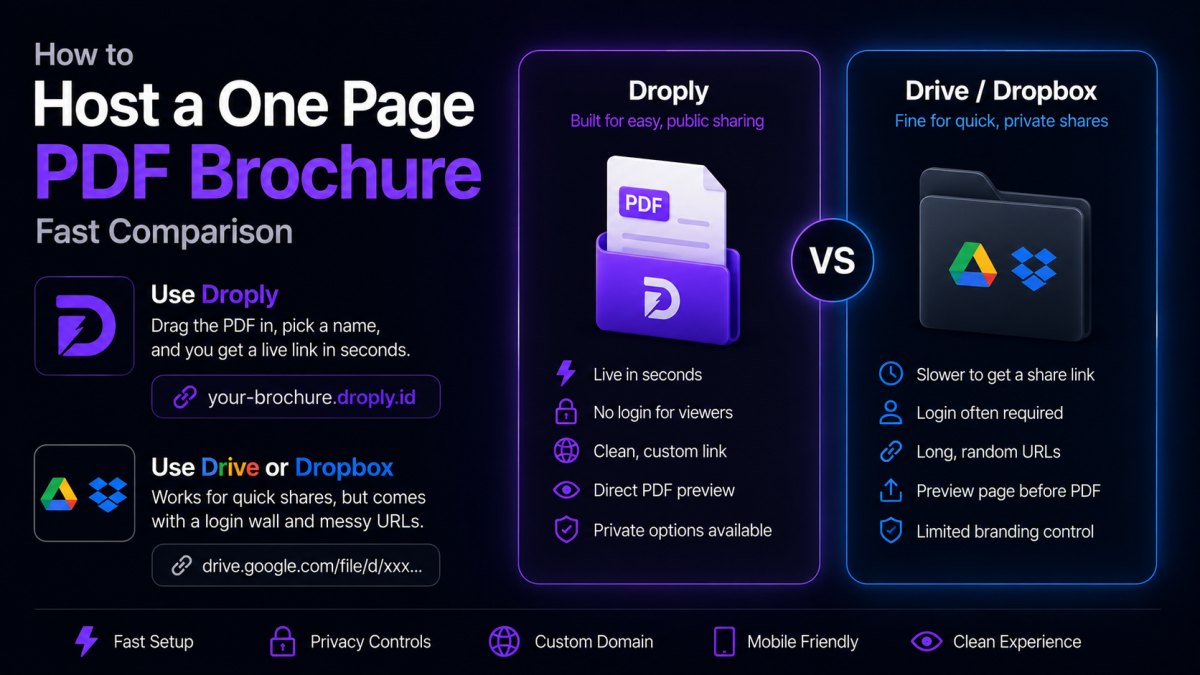
- Drag an HTML file, a ZIP of your site, or a PDF onto the page.
- Pick a name.
- Get a live HTTPS URL at
yourname.droply.idin seconds.
No Git connection, no first-deploy wizard, no waiting on a build queue. It's closer to "upload to Dropbox" than to "deploy to a platform."
Replace in place
Re-uploading to the same project replaces the content at the same URL. The URL never changes. That sounds small, but it matters when you've already sent a link to a client or pasted it into a doc. You iterate, they refresh, done.
Custom domains when you're ready
Free projects live at <name>.droply.id with a small "powered by" banner. Paid plans add custom domains and remove the banner. See /#pricing for current plans.
Cloudflare Pages vs Droply at a glance
A fair, factual comparison for the static-hosting case:
- Source of truth: Pages pulls from Git and builds. Droply takes a pre-built upload.
- Build system: Pages runs builds in the cloud. Droply doesn't build anything.
- Preview deploys: Pages creates one per branch/PR. Droply doesn't, you just create another project if you want a separate URL.
- Functions / SSR: Pages supports Workers and Functions. Droply is static only.
- Custom domains: Both support them.
- Workflow: Pages is Git-first. Droply is upload-first.
Neither is "better." They're aimed at different moments in a project's life.
How to migrate a pre-built site from Pages to Droply
If you're moving an existing static site off Cloudflare Pages, the process is short.
1. Get your built output locally
Run your normal build command on your machine:
- Next.js (static export):
next build, your output is inout/. - Astro:
npm run build, output indist/. - Hugo:
hugo, output inpublic/. - Eleventy:
npx @11ty/eleventy, output in_site/. - Vite:
npm run build, output indist/.
Open the folder and confirm there's an index.html at the root. That's the folder you'll upload.
2. Check your paths
Static hosts serve files exactly as they're laid out. Two things to double-check:
- Internal links and asset URLs should be relative or root-relative (
/styles.css, nothttps://your-pages-domain/styles.css). - If your framework has a "base path" or "site URL" setting, make sure it's not hardcoded to your old Pages URL.
3. Zip and upload
Select the contents of the build folder (not the folder itself), zip them, and drag the ZIP onto Droply. Pick a project name. You'll get a live URL immediately.
If your site is a single HTML file, skip the ZIP, just drop the .html file directly.
4. Test and iterate
Open the URL, click around, check the network tab for any 404s on assets. If something's off, fix it locally, rebuild, and re-upload to the same project. The URL stays put.
5. Point your domain (optional)
On a paid plan, add your custom domain and update your DNS. Once it propagates, you can decommission the Pages project.
When to stay on Pages
Be honest about your needs. Stay on Cloudflare Pages if you want:
- Automatic deploys on
git push. - Preview URLs for every pull request.
- Server-side logic via Functions or Workers.
- A team workflow tied to your repo's branch model.
Droply is deliberately narrower. It does one thing: take static files and serve them at a URL, fast.
The takeaway
If your project is a pre-built static site and the Git-plus-build-pipeline model feels like more than you need, Droply is the lighter path. Drag the folder, get a URL, send the link. When the requirements grow, you can always graduate to something heavier, but most static sites never need to.
Try it with your next project at droply.host.